The whole picture
Every way in. Every way out.
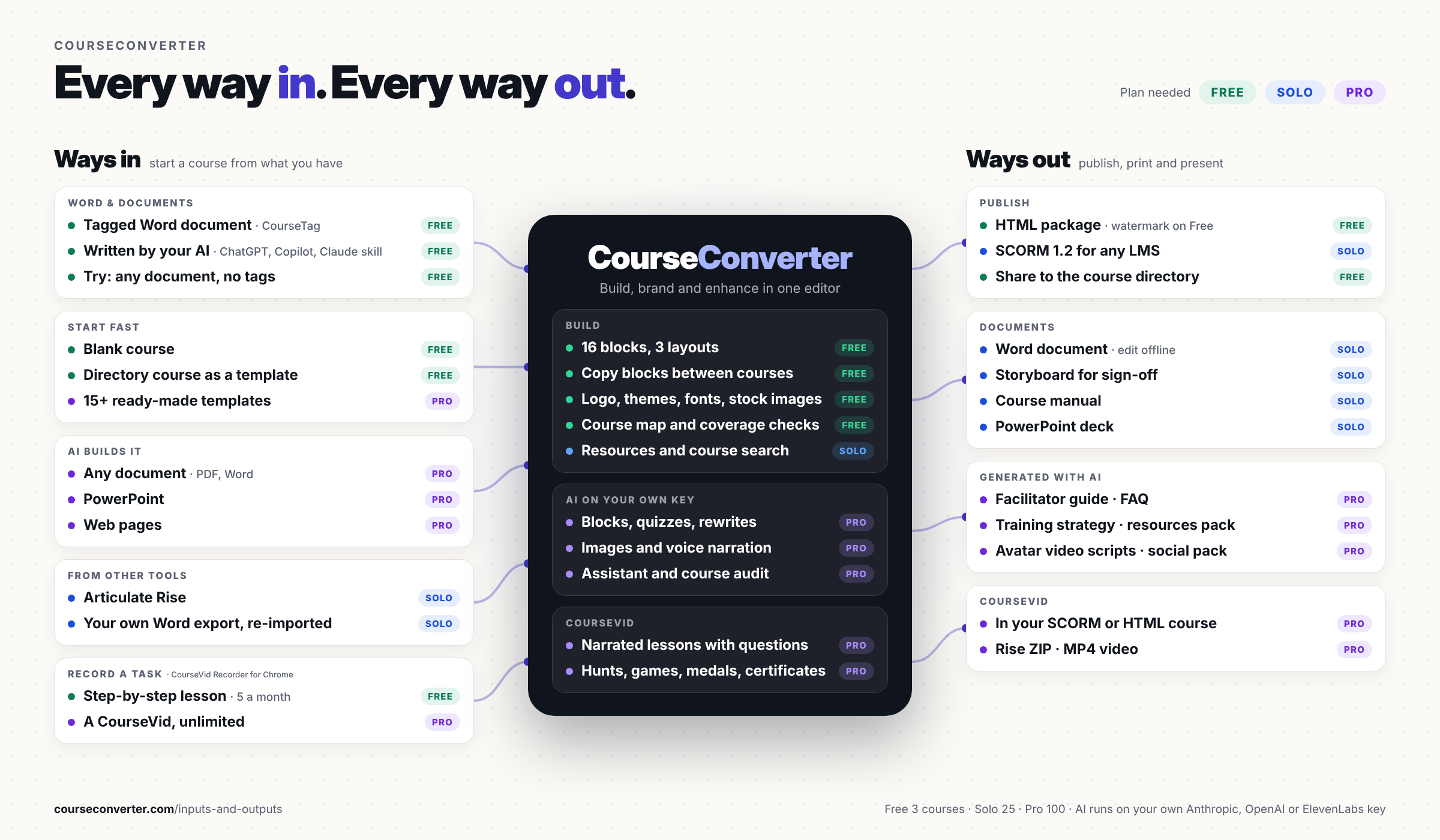
Bring in what you already have, build it into a course people finish, then publish it, print it and present it. Everything CourseConverter takes in and gives back, colour-coded by plan.
Ways in
Start from what you already have
Word documents, a draft from your favourite AI, slides, web pages, an old Rise course or a task you do every day: each one is a way into a finished course.
Word and documents
Import a tagged Word document
Headings become modules, paragraphs become text, and short [tags] become knowledge checks, flip cards, tabs and every other block.
Let your AI write it
Ask ChatGPT, Copilot or Gemini with the tag reference, or install the free CourseTag skill for Claude. You get a tagged Word document to import.
Try: any document, no tags
Drop in a policy, procedure or induction pack, or use our sample learner guide. It becomes a course in minutes, and you can save it.
Start fast
A directory course as a template
Copy any course in the directory into your account and make it yours.
A tagged Word doc from the library
Download the Word document behind a finished course, change it in Word and import it as your own.
15+ ready-made templates
Complete courses to adapt, from onboarding to compliance.
AI builds it
From any document
Upload a PDF or Word file. AI proposes an outline, you approve it, and it builds the modules.
From web pages
Paste documentation or help-page addresses and get a course built from them.
From other tools
Articulate Rise
Upload a Rise SCORM export. Text, images, tabs, accordions and process blocks come across; the rest is flagged for you.
Your own Word export, re-imported
Export a course to Word, edit it offline or with reviewers, and import it straight back.
Record a task
CourseVid Recorder for Chrome
Do a task once in any web app. Every click becomes a step with its screenshot: a step-by-step lesson in a new course or at the end of a module.
5 recordings a month on Free and Solo. Word download on Solo. Unlimited, and CourseVids, on Pro.
In the editor
Build it into a course people finish
One editor for blocks, branding, AI help and CourseVids. Everything saves as you go, and you can preview it exactly as a learner will.
Build and brand
16 blocks, 3 layouts
Knowledge checks, flip cards, tabs, accordions, process steps, matching, image hotspots, carousels and more.
Copy blocks between courses
Copy or move any block to another module, in this course or another of yours.
Block library
Save any block, a finished CourseVid included, and insert a copy into any course from Add block.
3 blocks on Free, unlimited on Solo and Pro.
Logo, themes, fonts, images
Your brand across every module, with Pexels and Pixabay photos built in.
Course map and coverage checks
See the whole course at a glance and spot gaps before learners do.
Resources and course search
Attach PDFs, templates, pictures and links, and let learners search the whole course.
10 MB a course on Solo, 20 MB on Pro.
AI on your own key
Blocks, quizzes and rewrites
Draft blocks and structured sections, generate knowledge checks from a module, and rewrite text side by side.
Images and voice narration
Illustrations, photos and diagrams, and narration in OpenAI or ElevenLabs voices.
Assistant and course audit
Ask AI how to do anything, or have it add blocks for you. The audit reviews pacing and sequencing.
CourseVid
Narrated lessons that stop for questions
A module becomes a narrated lesson with hunts, spot the difference, scores, medals and certificates, and every answer reports to your LMS.
Ways out
Publish it, print it, present it
One course becomes an LMS package, a website, a Word document for review and every document a facilitator, stakeholder or marketer needs.
Publish
HTML package
A zip that runs in any browser: a website, an intranet or a shared drive.
Watermarked on Free.
SCORM 1.2 for any LMS
Moodle, Canvas, TalentLMS, Cornerstone and the rest. Completion and scores report back.
Share to the course directory
List your course publicly so others can play it, download it or use it as a template.
Documents
Word document
The whole course with its tags: edit offline, send for review, import it back.
Storyboard
For stakeholder sign-off in Word, with a notes column.
Add an AI design rationale on Pro.
Generated with AI
Facilitator guide and FAQ
Timings, talking points, discussion prompts and answers.
Training strategy and resources pack
Approach, delivery plan and Kirkpatrick measures, plus a glossary and checked links.
Social media pack and graphics
A launch campaign and evergreen posts, with the images to go with them.
CourseVid
In your course, for Rise, or as MP4
CourseVids play inside your SCORM or HTML course, download as a ZIP for Rise, or export as an MP4 video.
Free, most with no sign-up
Free tools
What each plan adds
- Word import with CourseTag tags
- All 16 blocks, your branding, stock images
- Copy blocks, course map
- HTML export (watermarked)
- Recorder: 5 lessons a month
- Everything in Free, plus
- No watermark, SCORM 1.2 for any LMS
- Word export and re-import, Rise import
- Resources block and course search
- Storyboard, course manual, PowerPoint
- Everything in Solo, plus
- CourseVid: narrated, scored, with games
- AI courses, blocks, images, narration
- Facilitator guide, strategy, FAQ and more
- 15+ templates, priority support
Start with what you have
Turn a document into a course in a few minutes. Free, no card.