Your content is already written. It's just in the wrong format.
Word documents, slide decks, PDFs, help-centre pages, old SCORM packages. Import them and get an editable, interactive course you can put in any LMS — usually in minutes.
- Word import on every plan, including free
- Formatting, images and tables preserved
- Export to SCORM 1.2, HTML, or back to Word
No signup, no card · see pricing
The content isn't the problem. The conversion is.
Most organisations already have their training written down. It's in a policy document, an induction manual, a deck someone presented last year, a procedure that lives in the wiki. The knowledge exists and it's usually accurate.
What doesn't exist is a version anyone can learn from — something structured, interactive, trackable, and sitting in the LMS where staff can be assigned it. Getting from one to the other is where the weeks go: copying text into an authoring tool, rebuilding formatting, re-creating the images, writing quiz questions from scratch, then fighting the SCORM export.
That work is conversion, not instructional design. It adds nothing a learner will ever notice, and it's the single biggest reason good content sits in a folder instead of in front of the people who need it.
Start from whatever you have.
Five ways in. All of them produce the same thing: a real, editable course made of blocks.
Word documents
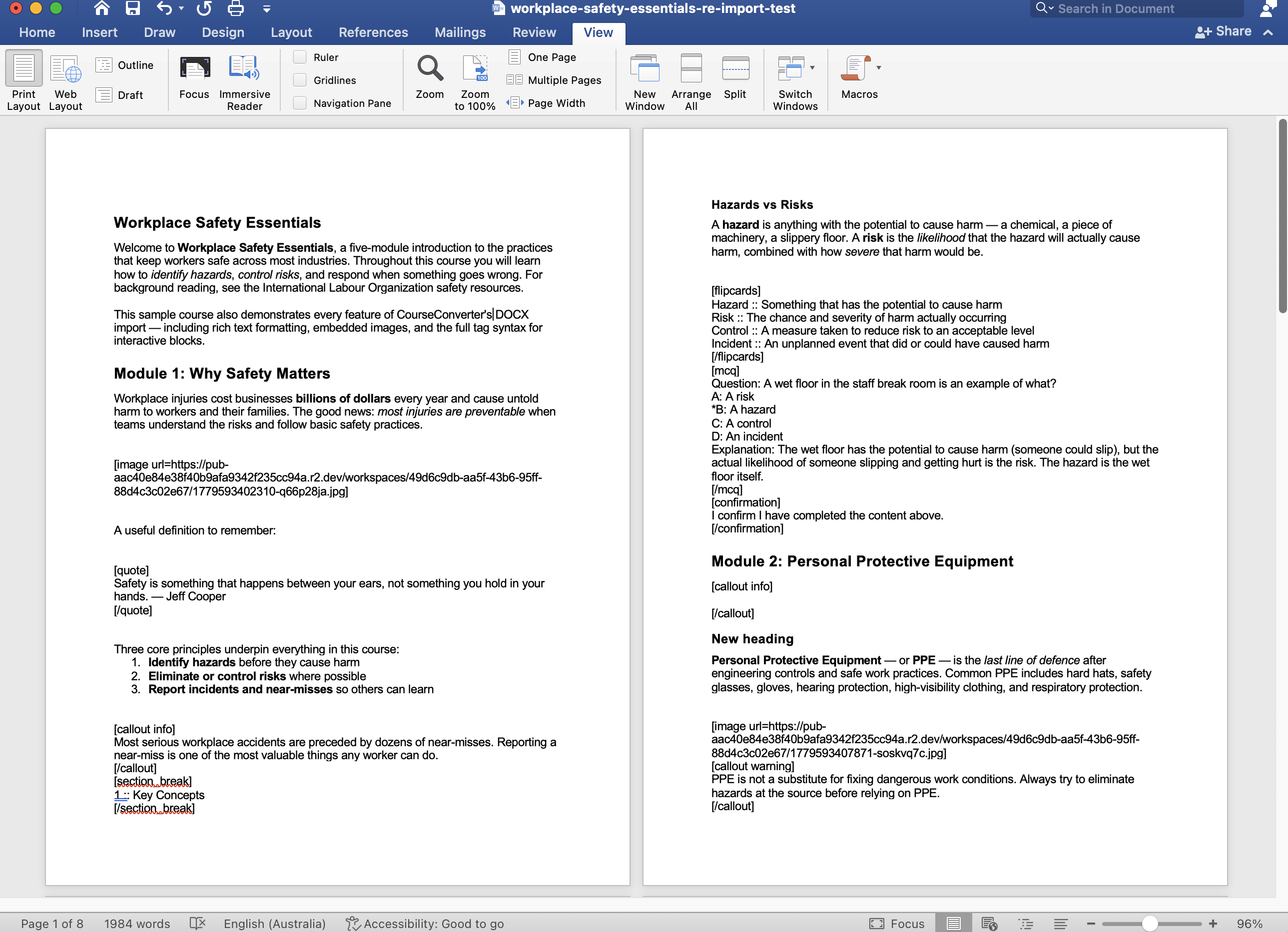
Import a .docx and keep your formatting — headings become modules, and your images, tables and links come with it. Use simple tags to create quizzes and flipcards straight from the document.
PowerPoint decks
AI reads your slides and speaker notes, groups them into modules, and drafts the course. You review the proposed structure before anything is created.
Articulate Rise courses
Moving off Rise? Import your SCORM export and it's rebuilt as an editable course — text, images, tabs, accordions and process blocks converted automatically.
Documentation & wiki pages
Paste up to 10 URLs — help centre, docs site, internal wiki — and AI builds a structured course from them, including the screenshots already on those pages.
Any document, with AI
Upload a PDF, a policy, a procedure or a transcript and AI drafts a complete first-pass course: modules, content, and knowledge checks for you to review and edit.
Or start blank
16 block types and 3 layout containers, plus 15+ ready-made templates on Pro. Sometimes the fastest path is building it directly.
Rise is the SCORM format we support today. Every tool packages SCORM differently, so we’re adding others as customers ask — if you’re moving from a different system, tell us which one.
A full course, in under two minutes.
A Word document going in, a finished interactive course coming out. No edits, no preparation — this is the actual import.
Import isn’t a one-way door.
Bringing content into a tool usually means it lives there now. That’s fine until you need a reviewer who works in Word, a client who wants a document, or an archive you can still open in five years.
Export any course back to a Word file — every module, every block, every knowledge check — edit it wherever you like, and re-import it as a fresh course. The round trip works, which means your content is yours.
Word export is available on Solo and Pro.
What the import actually does
Rich formatting survives
Headings become modules. Lists stay lists. Bold, italics, links, tables and images come through intact — you're not re-typing anything.
Build quizzes from Word
Simple tags in your document create knowledge checks, flipcards, callouts and accordions. Write the interactivity where you're already writing.
Everything stays editable
The import produces a real course made of blocks — not a locked conversion. Rewrite a paragraph, reorder a module, add a quiz.
Export to any LMS
SCORM 1.2 for Moodle, Canvas, TalentLMS, Cornerstone, Docebo and anything else SCORM-compliant. Or standalone HTML that runs anywhere.
And out to documents again
Export the finished course as a Word manual, a storyboard for sign-off, a facilitator guide, or a PowerPoint deck. One source, every format.
AI does the structuring
For PowerPoint and web pages, AI groups content into sensible modules and drafts knowledge checks — and shows you everything before it's created.
Common questions
- What happens to my formatting when I import a Word document?
- Headings, lists, bold and italic text, links, tables and embedded images all come through. Heading levels determine the module structure, so a well-structured document produces a well-structured course.
- Can I create quiz questions directly from Word?
- Yes. Simple tags in your document create knowledge checks, flipcards, callouts and accordions during import, so you can author the interactive parts without leaving Word.
- Which SCORM files can I import?
- Articulate Rise exports, on Solo and Pro — and free to try with no account at courseconverter.com/rise. Every authoring tool packages SCORM differently, so we started with Rise and are adding other systems as customers ask for them — tell us which tool you're moving from.
- Does importing a PowerPoint deck just make slides?
- No. AI reads the deck — including your speaker notes — and groups the slides into modules with real course content, then shows you the proposed structure before anything is created. Your images come across too.
- Do I need a paid plan to import a Word document?
- No. DOCX import with rich formatting is available on the free plan. Articulate Rise import is on Solo and Pro. PowerPoint import and building a course from web page URLs are Pro features.
- Can I get my content back out afterwards?
- Yes. Export any course back to a Word document — every module, block and knowledge check — edit it offline, and re-import it as a fresh course. Your content is never locked in.
Simple, honest pricing
Start free. Upgrade when you need SCORM exports, more courses, or Pro features. Cancel anytime.
Free
Try CourseConverter with 3 courses.
- 3 courses
- HTML export (with watermark)
- DOCX import with rich formatting
- All 16 content blocks + 3 layouts
- Logo branding, themes, fonts
- Pexels + Pixabay image library
- Support knowledge base
Solo
For individuals shipping real courses.
- 25 courses
- HTML + SCORM 1.2 exports
- DOCX import with rich formatting
- All 16 content blocks + 3 layouts
- Word (.docx) export — edit offline & re-import
- Import from Articulate Rise (SCORM)
- Storyboard & course manual exports
- No watermark
- Logo branding, themes, fonts
- Pexels + Pixabay image library
- Support knowledge base
Pro
For teams and power users.
- 100 courses
- HTML + SCORM 1.2 exports
- DOCX import with rich formatting
- All 16 content blocks + 3 layouts
- Word (.docx) export — edit offline & re-import
- Import from Articulate Rise (SCORM)
- Import from PowerPoint with AI
- No watermark
- Logo branding, themes, fonts
- Pexels + Pixabay image library
- 15+ reusable course templates
- AI course generation from document
- AI course generation from web page URLs
- AI block generation (bring your own key)
- AI image generation (illustrations, photos, diagrams)
- AI text-to-speech narration (OpenAI + ElevenLabs voices, bring your own key)
- AI knowledge-check generation
- AI text rewrite & structured sections
- AI course audit
- AI FAQ generator
- AI resources document (verified links & glossary)
- AI training strategy for client sign-off
- Storyboard, manual & facilitator guide exports
- PowerPoint deck export (with AI speaker notes)
- Early access to new AI features
- Support knowledge base
- Priority email support
Import a document and see what comes out.
The free plan includes Word import and three courses. No card required — try it with a real document rather than taking our word for it.
Start free