Do the task once. Get the training.
Record a task in any web app. Every click becomes a step with its own screenshot, ready to turn into a CourseVid, a step-by-step lesson or a Word document in CourseConverter.
- Free: 5 recordings a month
- Any web app in Chrome
- Blurred before it leaves your computer
Free tier, no card required.
A how-to guide takes hours, and it's out of date by the next release.
Screenshot, crop, add an arrow, write the step, repeat. A ten-step task is an afternoon of work, and when the screens change it starts again. So most software training is a link to an old video or a PDF nobody trusts.
With the recorder, you do the task once and the steps write themselves, each with the screenshot it came from. Check them, blur anything private, and send them to CourseConverter as a CourseVid your learners can click through, or a lesson anyone can follow.
How it works
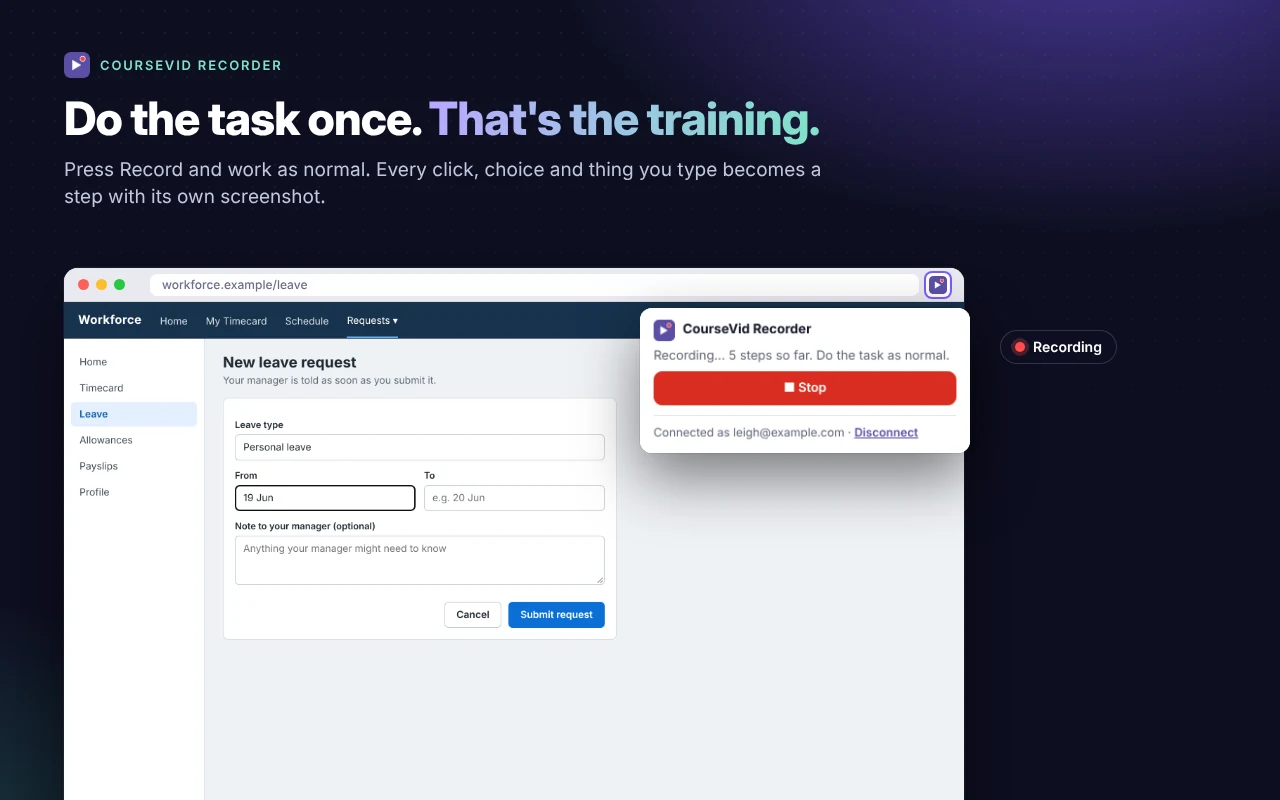
The real extension, recording a leave request in a demo HR app.
- 1
Press Record and do the task
Open the app you want to teach and press Record. Then work as you normally would. Every click, every choice and everything you type becomes a numbered step, with a screenshot of the screen as it was.
- 2
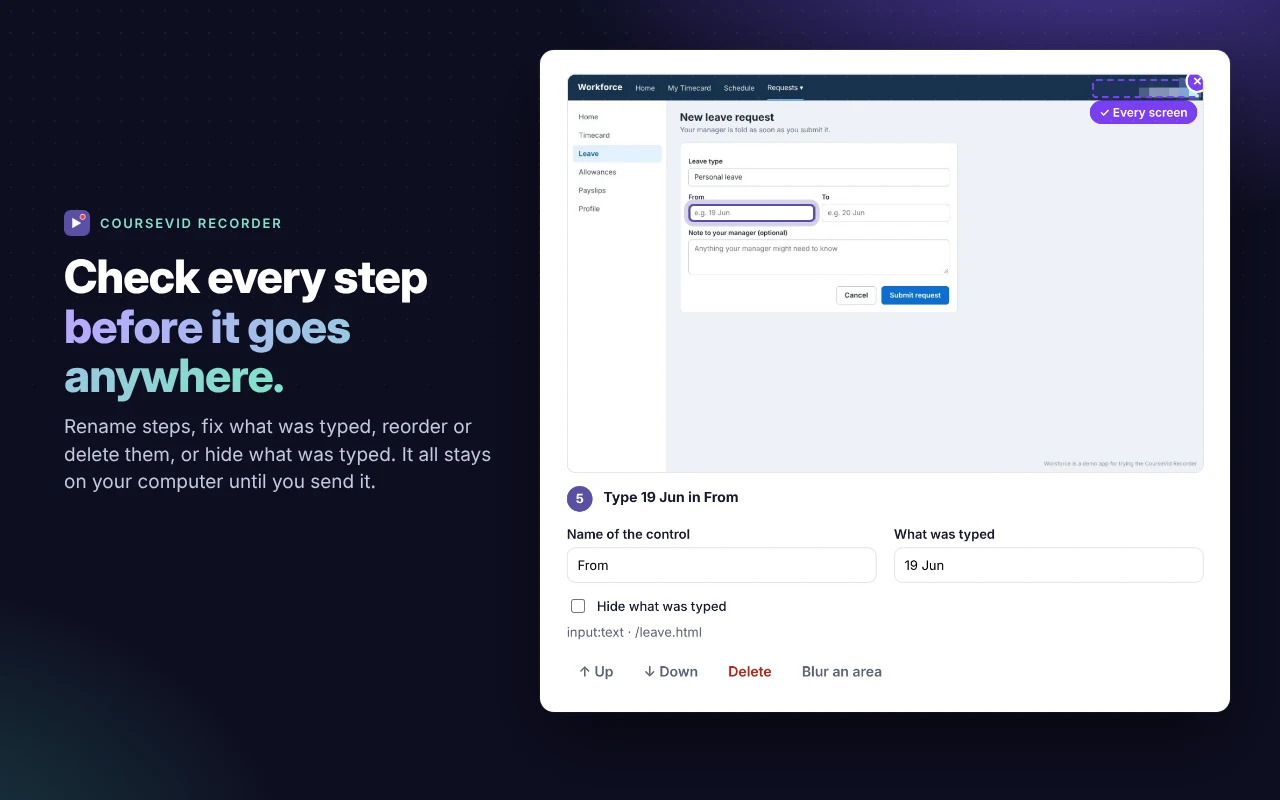
Check every step
Press Stop and the review page opens. Rename a step, fix what was typed, move or delete steps, or hide what was typed altogether. Changes save as you go, with Undo.
- 3
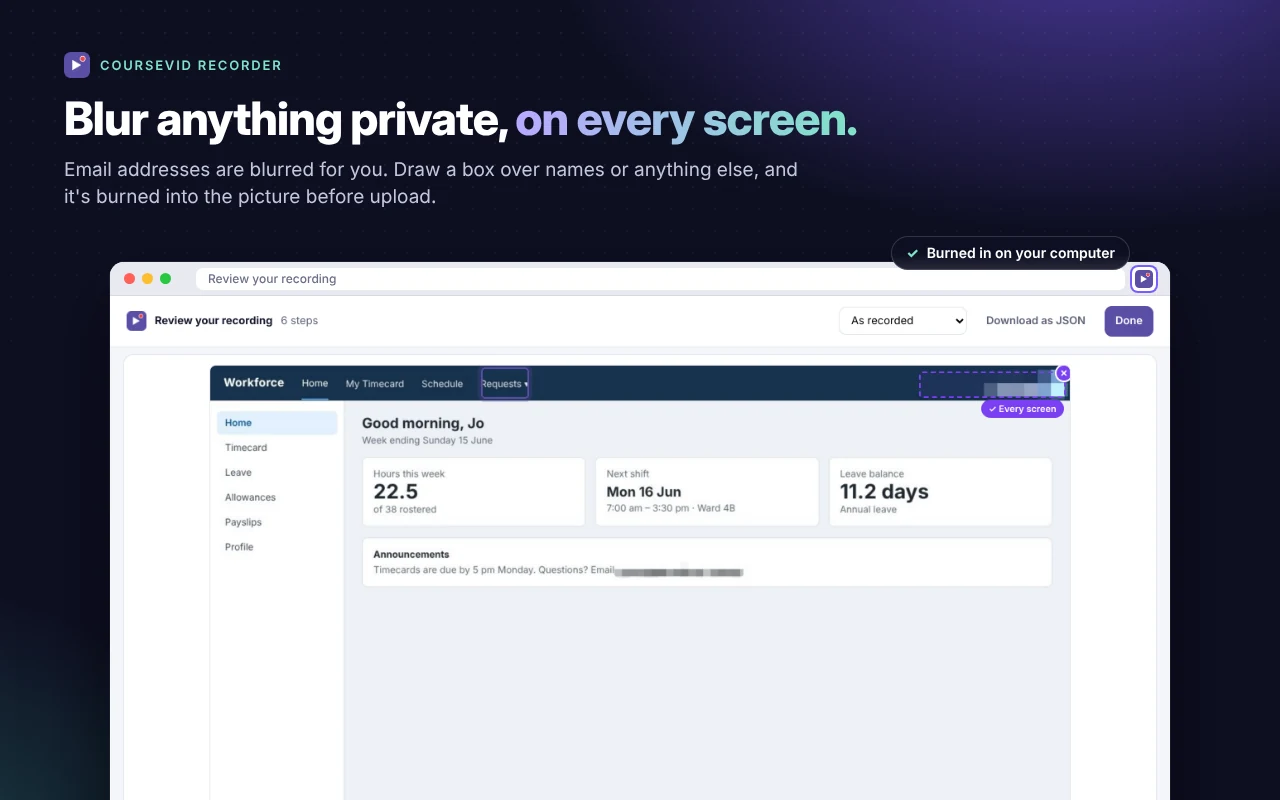
Blur anything private
Email addresses are blurred for you, and filled-in fields can be too. Draw a box over a name or anything else, on one screen or on every screen. The blur is burned into the picture on your computer, so the original never leaves it.
- 4
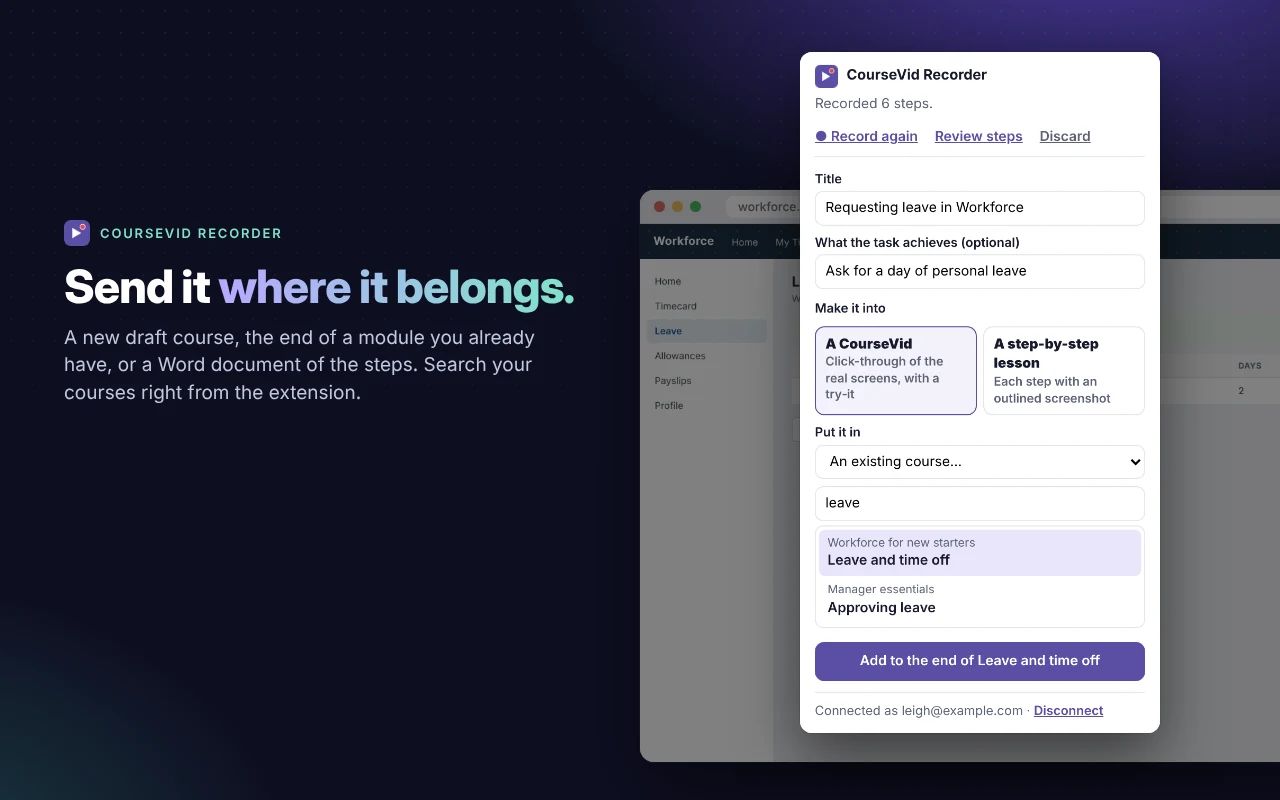
Send it where it belongs
A new draft course, the end of a module you already have, or a Word document of the steps. Search your courses and modules right from the extension.
- 5
Get a CourseVid or a lesson
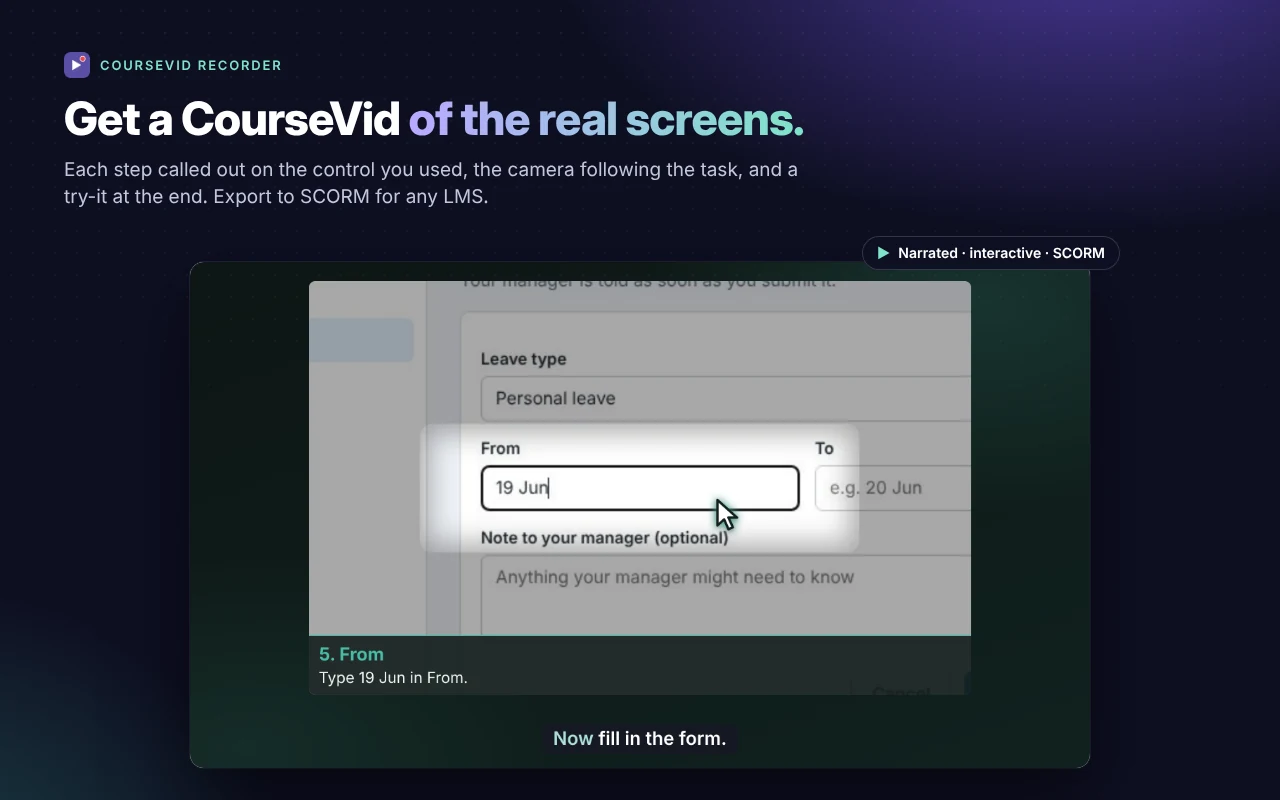
On Pro, a CourseVid: each step called out on the real screen, the camera following the task, and a try-it where learners click through it themselves. On every plan, a step-by-step lesson with each control outlined and numbered.
Set up in two minutes
- 1
Add it to Chrome
Install the CourseVid Recorder from the Chrome Web Store and pin it to your toolbar.
- 2
Connect your account
Click the extension and choose Connect. Sign in to CourseConverter and it's linked. Disconnect any time from the extension.
- 3
Record a task
Open the app you want to teach, press Record, and do the task. Press Stop when you're done.
What it records and where it goes: CourseVid Recorder privacy policy.
Built for software training
Any web app
HR systems, CRMs, finance tools, intranets, your own product. If it runs in a Chrome tab, you can record it. It follows the task into new tabs it opens.
Steps written for you
Each step is named from the control you used: Click Leave type, Choose Personal leave, Type 19 Jun in From. Rename any of them before you send.
Blurred on your computer
Emails blurred automatically, fields if you choose, and boxes you draw yourself. Blurring is burned in before upload. Passwords are never recorded at all.
A CourseVid of the real screens
Callouts on each control, a camera that follows the task, a try-it at the end, and every answer reported to your LMS. Add a voice in the editor.
A step-by-step lesson
Every plan gets a lesson with each screenshot outlined and numbered, plain instructions under each one, and the steps at a glance at the end.
Or a Word document
Download the steps as a CourseTag Word document to edit, send to a subject matter expert, or import later. On Solo and Pro.
Straight into your course
Add it to the end of any module, or start a new draft course. The screenshots upload straight to your course's storage.
Menus that vanish
Some menus close the moment the mouse moves. Press Alt+Shift+S to take a picture of the screen exactly as it is.
Nothing until you press Record
It records only the tab you chose, only while recording, and keeps everything on your computer until you send it. No tracking and no analytics.
Common questions
- Is the CourseVid Recorder free?
- Yes. Recording is free on every plan, with five recordings a month on the free plan, made into step-by-step lessons. CourseVids are part of the Pro plan, and the Word download is on Solo and Pro.
- What does it record?
- Only while you are recording, and only in the tab you chose: a screenshot of the visible page when it changes and when you click, the name and position of each control you used, what you typed or chose (which you can hide or change), and the page address. Passwords are never read.
- Does my recording leave my computer straight away?
- No. It stays in the extension on your computer until you press Send. You can review it, blur it, edit it or discard it first. When you send it, the blurring is burned into the screenshots before they upload.
- Does it work with any website?
- Any page you can open in a normal Chrome tab. Chrome does not let extensions record its own pages, such as settings and the Chrome Web Store. Content inside frames from another site is recorded as a screenshot, but its clicks are not.
- How do I add narration to the CourseVid?
- Open it in the editor and use the voice step, with OpenAI or ElevenLabs voices on your own key. Each scene's words are already written from your steps, so you can change them first.
- What if the software changes?
- Record the task again. It takes as long as doing it once, and you can add the new version to the same module and remove the old one.
Simple, honest pricing
Start free. Upgrade when you need SCORM, CourseVids or AI. Cancel anytime.
Free
Build and try, with 3 courses.
Includes
- 3 courses, HTML export (with watermark)
- Word import, with tags for every block
- All 16 blocks and 3 layouts
- Your logo, themes and fonts
- Pexels and Pixabay image libraries
- Course map and coverage checks
Solo
For one person publishing to an LMS.
Everything in Free, plus
- 25 courses, no watermark
- SCORM 1.2 for any LMS
- Word export: edit offline, re-import
- Articulate Rise import
- Storyboard and course manual
- Course resources and search: PDFs, templates, pictures and links, searchable inside the courseNew
- Block library: save any block and reuse it in every courseNew
Pro
CourseVids, AI and the full document suite.
Everything in Solo, plus
- CourseVid: narrated lessons that stop to ask, and report to your LMSNew
- Hunts, spot the difference, medals and certificatesNew
- AI course from a document, PowerPoint or web pages
- AI blocks, quizzes, images, rewrites and voice narration
- AI assistant and course audit
- Facilitator guide, PowerPoint deck, FAQ, resources, training strategy
- 100 courses and 15+ templates
- Priority support and early access
Annual billing saves ~17%. 14-day money-back guarantee. Secure checkout by Stripe.
Compare every feature
| Feature | Free | Solo | Pro |
|---|---|---|---|
| Courses & publishing | |||
| Courses | 3 | 25 | 100 |
| HTML export | Watermarked | ||
| SCORM 1.2 export for any LMS | |||
| Word (.docx) export and re-import | |||
| Import | |||
| Word import with CourseTag tags | |||
| Articulate Rise import | |||
| PowerPoint import with AI | |||
| AI course from a document | |||
| AI course from web pages | |||
| Build & brand | |||
| 16 content blocks and 3 layouts | |||
| Logo, themes and fonts | |||
| Pexels and Pixabay image libraries | |||
| Course map and coverage checks | |||
| Resources block: files, pictures and links | 10 MB a course | 20 MB a course | |
| Course search, including resources and CourseVid narration | |||
| Block library: save blocks and reuse them in any course | 3 blocks | Unlimited | Unlimited |
| 15+ ready-made course templates | |||
| CourseVid | |||
| Narrated CourseVid lessons with questions | |||
| Hunts, spot the difference and game feel | |||
| Scores, medals, awards and certificates | |||
| Reuse a finished CourseVid in any course, no credits | |||
| AI, on your own key | |||
| Draft blocks and knowledge checks | |||
| Image generation: illustrations, photos, diagrams | |||
| Voice narration (OpenAI, ElevenLabs) | |||
| Rewrite and structured sections | |||
| Assistant in the editor | |||
| Course audit: pacing and sequencing | |||
| Documents around the course | |||
| Storyboard and course manual | |||
| Facilitator guide and PowerPoint deck | |||
| FAQ, resources pack and training strategy | |||
| Support | |||
| Help centre | |||
| Priority email support | |||
| Early access to new features | |||
Record your first task.
Create a free account, add the extension to Chrome, and connect it. Your first five recordings this month are on us.
Start free